Compare three light laptops built for online lectures, assignments and browsing, then take yours home on Easy EMIs with tenures of 3 to 60 months.
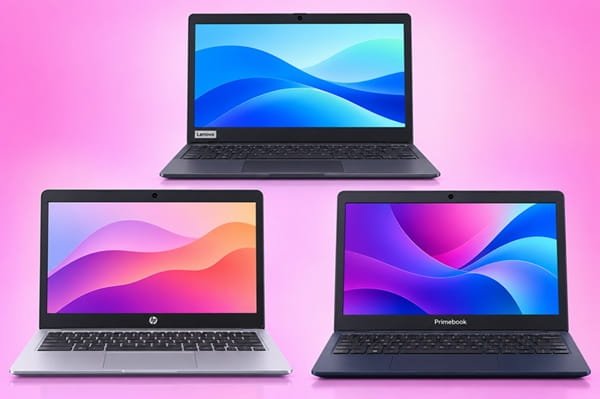
A laptop under Rs. 20,000 can handle your online classes, school projects, emails and video calls. This guide looks at three picks for that kind of daily work: the Lenovo Chromebook 11IJL9, the HP Chromebook 11MK G9 Education Edition and the Primebook 2 Neo. Each has an 11.6-inch screen and weighs 1.34 kg or less, so it fits easily into a college bag.
For a wider range, browse more laptops under Rs. 20,000 and laptops for students under Rs. 20,000. You can buy any of them on Easy EMIs at Bajaj Finance’s 1.5 lakh+ partner stores across 4,000+ cities. The Bajaj Finance Easy EMI Loan gives you a loan offer amount of up to Rs. 5 lakh, with a tenure of 3–60 months.
How do the key specs of these laptops stack up?
Memory, storage and software shape how a budget laptop feels each day. Here they are side by side.
| Spec | Lenovo Chromebook 11IJL9 | HP Chromebook 11MK G9 EE | Primebook 2 Neo |
| Processor | Intel Celeron N4500 | MediaTek MT8183 | MediaTek Helio G99 |
| RAM | 4GB | 4GB | 6GB |
| Storage | 64GB eMMC | 32GB eMMC | 128GB UFS 2.2 |
| Display | 11.6-inch HD | 11.6-inch HD IPS | 11.6-inch HD IPS |
| OS | ChromeOS | ChromeOS | PrimeOS 3.0 (Android 15) |
| Weight | 1.21 kg | 1.34 kg | 0.99 kg |
All three share the same screen size and resolution, so your choice comes down to memory, storage and software. The Primebook 2 Neo gives you more RAM and storage than the other two. The two Chromebooks rely on cloud apps and online storage.
How do these laptops compare for classes and everyday work?
Lenovo Chromebook 11IJL9
The Lenovo Chromebook 11IJL9 runs on an Intel Celeron N4500 dual-core processor with speeds of up to 2.8GHz, paired with 4GB RAM. ChromeOS runs browser-based tools such as Google Docs, Classroom and Meet, so lessons and notes open quickly. A 720p webcam with a privacy shutter covers your video lectures. The 64GB storage holds your downloaded PDFs and offline files, while Google Drive keeps the rest safe online.
HP Chromebook 11MK G9 Education Edition
HP designed this Chromebook for students. It uses a MediaTek MT8183 octa-core processor at 2.0GHz with 4GB RAM. It works best when you save files to the cloud, as it comes with 32GB storage. It suits a simple routine of classes, research and typing up assignments.
Primebook 2 Neo
The Primebook 2 Neo pairs a MediaTek Helio G99 octa-core processor with 6GB RAM. It runs PrimeOS 3.0, built on Android 15, which gives you a desktop-style layout with familiar Android features. You can also pay for optional cloud access to Windows and Linux when a course needs desktop software. With 128GB storage, you get more room for files kept on the device.
How do the display, battery and build compare?
Each laptop has an 11.6-inch HD screen, which works well for reading notes and joining video lectures. The HP and Primebook models use IPS panels, which keep colours steady when you view from an angle. The Lenovo has an anti-glare finish that helps in bright rooms.
The HP packs a 47 Wh battery and charges with a 45 W adapter. The Primebook 2 Neo weighs 0.99 kg and measures 17 mm thick, so it slips easily into a bag between classes. The Lenovo adds a rubber bumper around the top edge to help it handle daily knocks.
| Spec | Lenovo Chromebook 11IJL9 | HP Chromebook 11MK G9 EE | Primebook 2 Neo |
| Graphics | Intel UHD | Arm Mali-G72 MP3 | Arm Mali-G57 |
| Battery | 42 Wh | 47 Wh | 29.6 Wh |
How much do these laptops cost?
All three come in under Rs. 20,000. That leaves room in your budget for a laptop bag or a mouse. Spread across Easy EMIs, the monthly amount sits easily alongside fees and household costs.
| Laptop | Configuration | Price |
| Lenovo Chromebook 11IJL9 (82UY0014HA) | 4GB + 64GB | Rs. 15,990 |
| HP Chromebook 11MK G9 EE (7D2W3PC) | 4GB + 32GB | Rs. 17,980 |
| Primebook 2 Neo | 6GB + 128GB | Rs. 19,990 |
Disclaimer: Prices may change based on availability, offers, and location. Please check the latest price before buying.
What offers can you get on these laptops?
With Bajaj Finance, you can buy your laptop without paying the full price on day one. You can get zero down payment on select models, so you need nothing upfront. Easy EMIs start from Rs. 830, and you choose a tenure from 3 to 60 months.
A shorter tenure lets you finish repaying sooner. A longer one keeps each instalment small, which helps if you’re a student or on a tight monthly budget. You can also get up to 60% off select laptops, which lowers the amount you finance.
How can you buy these laptops on Easy EMIs?
You can pay with the Bajaj Finance Easy EMI Loan or the Bajaj Finance Insta EMI Card, which offers a loan offer amount of up to Rs. 3 lakh. The process takes one store visit. Before you go, check your loan eligibility online so you know your limit.
- Visit a Bajaj Finance partner store near you.
- Pick the laptop that suits your classes and work.
- Choose the Easy EMI Loan or your Insta EMI Card at billing.
- Complete a quick verification with your basic details.
- Select a tenure from 3 to 60 months.
- Take your new laptop home.
Which laptop under Rs. 20,000 fits your routine?
If you work mostly in Google’s apps, the Lenovo Chromebook 11IJL9 gives you a sturdy build, a privacy-shutter webcam and 64GB storage. The HP Chromebook 11MK G9 Education Edition suits students who want a 47 Wh battery for full days of classes. If you want 6GB RAM, 128GB storage and a sub-1 kg build, the Primebook 2 Neo fits. Whichever you choose, you can spread the cost on Easy EMIs over 3–60 months at 1.5 lakh+ partner stores across 4,000+ cities.